Concept in validation · Sign-ups for the future beta
Fewer things to keep in mind. More time for family.
We are preparing HomeOS: a shared space for the family calendar, tasks, shopping and the running of your home, with an assistant that helps you see what is next. Tell us what would be useful for your family and sign up for news about testing.
Free. No card. No obligation to buy. Beta invitations will depend on availability.
- Shared family calendar
- Tasks with an owner
- Shopping and due dates
- In-app daily summary
SHA-256 f6f4def1375876f69fb13a488fb8b359f9ad92c4d28812c6c7a8a69367702c04 — the images on this page are crops of this file, exported without regeneration or retouching.
A familiar situation
The home runs on what one person remembers
Who is taking them to practice? What else do we need to buy? When is the next service due? When the answers live in several calendars and conversations, keeping the home running can end up in the care of one person. We want to build a place where the family can coordinate it together.
The information is scattered
The schedule is in one app, the shopping list in a chat, the due dates on paper. Nothing is lost — it is simply not in one place when you need it.
Responsibilities are unclear
Both adults assume the other one is handling it. A task without an owner leaves everyone guessing.
One person carries the mental load
Someone has to remember everything for everybody, and the load lands on whoever set things up in the first place.
Simple questions take too long
“What do we have tomorrow?” should not require opening three apps and asking two people.
These are product hypotheses we want to test, not measurements. We do not yet have data on how often they happen or how much time they cost.
What we are building
One shared place for the things that matter
HomeOS is being designed to bring the family's schedule, responsibilities, shopping and home upkeep into one space that anyone in the household can check from a laptop or a phone.
Shared schedule
See the family's activities in one place, so nobody has to paste their week into a chat.
Clear responsibilities
Every task can have an adult owner and a due date, reducing the guesswork about who is on it.
A useful daily summary
Start the day with the events and due dates that matter instead of checking several lists.
Coordinated shopping
Both adults update the same list and can see what has already been bought.
Visible due dates
One place for manually entered payment reminders, without giving access to a bank account.
Planned upkeep
Organise recurring services and chores before they are forgotten. We do not promise to prevent breakdowns.
Questions in plain language
“What do we have tomorrow?” should return an answer tied to your family calendar, not a generic one.
Phone and laptop
The same household and the same information in a responsive app, with fewer transfers between tools.
One subscription per household
The proposed price covers the adults invited to the same family, with no Pro, Premium or Business tiers and no separate fee per adult.
The concept
Five screens that show the direction
These images come from the web mockup built during the concept phase. They are cut from the original file without regenerating, completing or retouching the interface. The functional descriptions are product proposals; they are not proof that the buttons work.
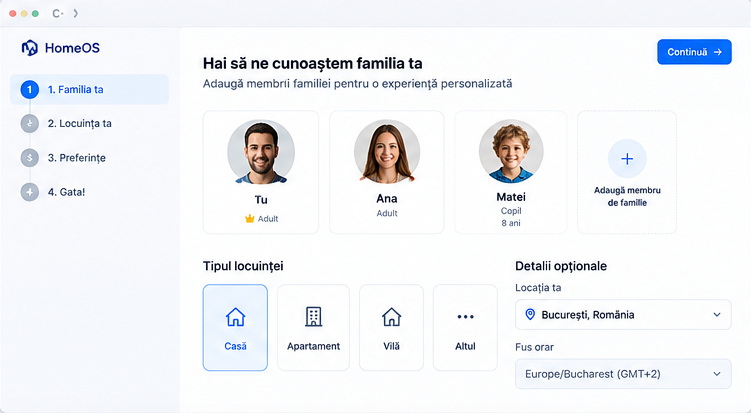 01OnboardingConcept mockup
Setting up the family and the home
- Visible in the mockup
- Steps for family, home and preferences; member cards; add a member; home types; location and time zone; a continue button.
- Proposed function
- Creating the household, inviting adults and choosing minimal preferences. Location and a photo must not be mandatory. The time zone must be configured correctly, including seasonal changes. A full address is not needed for the calendar and lists.
- 02OverviewConcept mockup
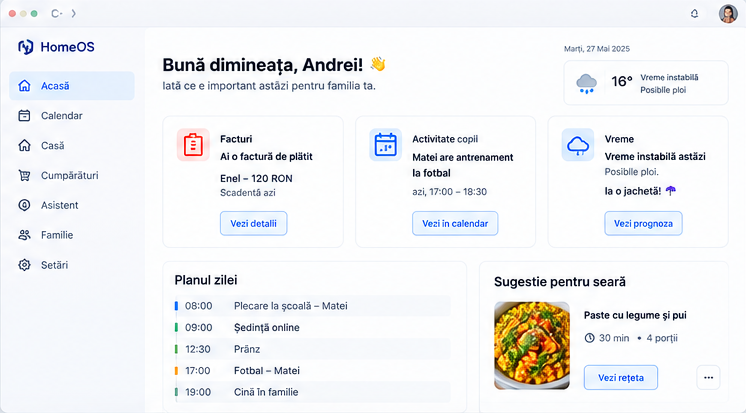
Dashboard — a proactive summary
- Visible in the mockup
- A bill and its due date, a child's activity, the weather, the plan for the day and a dinner suggestion.
- Proposed function
- For the MVP, a summary of the events, tasks and due dates entered by the family. “Bill to pay” means a reminder, not bank access or automatic payment. Weather and recipe suggestions are concept elements, conditional on sources and later validation.
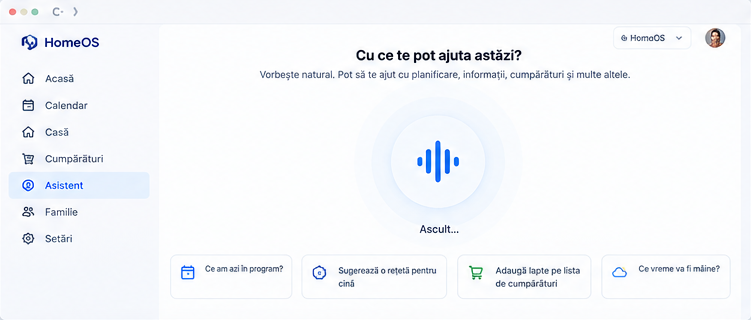 03AssistantConcept mockup
Voice assistant and conversation
- Visible in the mockup
- A central voice control, the “Listening…” state and example questions about the schedule, dinner, shopping and the weather.
- Proposed function
- Text conversation and voice that is deliberately activated, for a narrow set of operations. The system would show the transcript and ask for confirmation before changing anything. We do not assume always-on listening, perfect understanding or reliable voice identification.
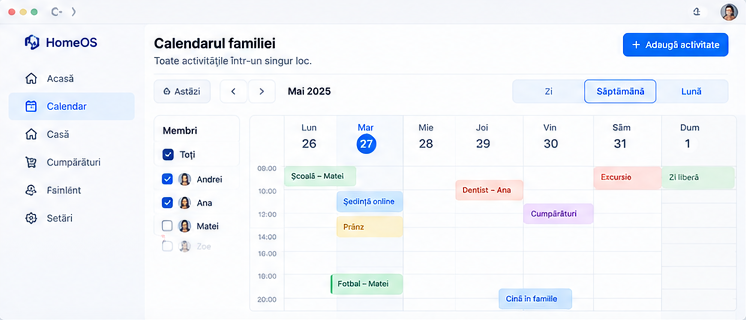 04CalendarConcept mockup
Family calendar and activities
- Visible in the mockup
- A weekly calendar, filters for members, navigation between periods, day/week/month options and adding an activity.
- Proposed function
- Internal events with a participant, a time range and visibility. The first MVP does not depend on connecting to Google Calendar or Outlook. Filtering and permissions must be defined separately: hiding a card in a filter does not protect the data.
 05HomeConcept mockup
Running the home and unexpected situations
- Visible in the mockup
- Categories for maintenance, unexpected situations, efficiency, shopping, recipes and documents or bills; search with the example “smell of gas”.
- Proposed function
- For the MVP: maintenance tasks, a shopping list, notes and manual due dates; safety information approved editorially, with no AI diagnosis. Recipes, uploaded documents, commercial recommendations and automations are on the roadmap.
- Source limitation
- This panel is a panoramic strip that ran to the bottom edge of the original image. The export keeps only the available content and does not invent the rest of the page.
Examples in the mockups — names, the location Bucharest, the currency RON and the May 2025 date — are demonstration content, not pilot data.
How it would work
Three steps, then a daily loop
The idea is to validate shared organisation before adding many integrations.
- 1
Create the family space
One adult sets up the household, chooses the language and invites the other adults. Invitations can be revoked.
- 2
Add shared activities and lists
Events, tasks with an owner, shopping and due dates — entered by any member of the household.
- 3
Check the plan and confirm changes
You read the day's summary, tick off what is done, and approve anything the assistant proposes before it is written.
The value loop we want to test
Tell us whether this direction matches how your household actually works. Comments and interview answers shape the first version more than feature lists do.
- 1The family enters activities, tasks, lists and due dates.
- 2HomeOS organises them by time, owner and context.
- 3A daily summary highlights what is relevant.
- 4Members confirm, correct and tick off what they have done.
- 5The shared information stays current for the next day.
Scope
What a first testable version would include
Success would mean the family comes back to coordinate real things — not that the AI had many conversations.
Proposed for the MVP
Account and household
Accounts for adults, invitations, revoking access.
Minimum acceptance criterion: An invited adult sees only the permitted data of their own household.
Internal calendar
Create, edit, delete, participant and time zone.
Minimum acceptance criterion: Time and changes are consistent for authorised adults.
Shared tasks
Owner, due date, status and simple recurrence.
Minimum acceptance criterion: A task ticked off updates for the other members.
Shopping
A shared list and marking items as bought.
Minimum acceptance criterion: Changes are not lost when two members use the list at once.
Due dates and upkeep
Manually entered reminders.
Minimum acceptance criterion: The date and the source are visible; nothing suggests a bill has been paid.
Daily summary
An in-app summary built from household data.
Minimum acceptance criterion: Each item can be traced back to the original event or task.
Assistant
Text, with voice on request, for questions and simple proposals.
Minimum acceptance criterion: A change is applied only after confirmation and only if the operation succeeded.
Control and privacy
Permissions, an action log, export and deletion.
Minimum acceptance criterion: Sensitive actions and cross-household access are tested before beta.
Safety help
Fixed content, verified and localised for the pilot.
Minimum acceptance criterion: The answer about gas does not improvise repairs and does not delay a call.
Later, and conditional
Calendar import and sync, notifications, dinner suggestions
Notifications start as in-app reminders; push and email are added once delivery and preferences are tested.
Condition to start: Families use the shared features consistently and ask for the integration.
Documents, warranties, due dates extracted from bills
Storage, permissions, deletion and correction of extracted values.
Condition to start: Privacy testing is complete.
Weather forecast and contextual recommendations
Only with licensed data and a visible last-updated time.
Condition to start: Supplier evaluation and sustainable cost.
Limited smart-home integrations
A risk analysis for every device and every action.
Condition to start: Safety work is mature.
TV display mode, later TV apps
Protecting information on shared screens.
Condition to start: Demonstrated phone and laptop usage.
Experiences designed for children
Age-appropriate design, a data protection impact assessment and verified permissions.
Condition to start: An evaluation of access for minors.
Automatic payments, purchases without approval, contracting services and controlling gas installations are outside the MVP. Voice, reminders and integrations are only promised once they are actually verified — if voice is not ready, we will say plainly that the beta is text-only.
Recommended order of implementation: calendar, tasks and lists → summaries based on your data → text assistant → limited voice.
Indicative pricing
One subscription per family
We are exploring a single plan. There are no Pro, Premium or Business tiers and no separate fee per adult.
£7.99
per family, per month
Indicative launch price: £7.99 per family per month. We are still validating the product and the price. Joining the waitlist is free.
- Adults invited to the same household
- Shared calendar, tasks and shopping lists
- Manually entered due dates and upkeep reminders
- The in-app daily summary
This is not an active offer and there is no checkout on this page. We do not take paid pre-orders during this validation campaign.
To be settled and published before any commercial launch
- The final consumer price, with the applicable taxes, the period and the renewal terms.
- What counts as a household and how we treat abusive use, with no hidden limits on members.
- A volume of voice and AI that is sustainable at this price — we do not promise unlimited use before measuring the costs.
- Cancellation terms, any trial period and the refund policy.
- The currencies and geographic areas available; the pound price does not automatically set the price for Romania.
The economic validation we owe you is honest: net revenue actually collected, minus payment, voice and AI, infrastructure and support costs attributable to a household. £7.99 does not yet prove profitability.
The price is shown in pounds sterling because that is the currency of this validation hypothesis. A local price for your market would have to be confirmed separately before launch.
Privacy, control and limits
An assistant that asks before it acts
We are designing HomeOS with clear permissions and confirmation for changes. Privacy and the limits of the assistant will be part of beta testing.
Only what is needed
Photos, a full address, precise geolocation and continuous microphone recording are not required for the MVP. Voice is activated on request, with a visible indicator and an immediate stop.
Shared and private are separated by real permissions
An adult does not automatically gain the right to see another adult's private conversations. Household data separation and permission checks happen on the server for every operation — a visual filter is not enough.
Audio is not kept by default
Transcripts and contextual memory must have an explicit purpose, duration and deletion control. If an external provider processes voice or text, you are told before you activate it.
Nothing sensitive happens without confirmation
Inviting people or changing access is limited to an authorised adult. Sending external messages, making bookings or buying is excluded from the MVP. Paying bills, signing contracts and controlling dangerous installations are excluded too.
We do not claim what we have not verified
No “guaranteed security”, “completely private” or “GDPR certified” until there is a real, specific basis. We do not claim suppliers avoid training on your data until configurations and contracts are checked.
A design requirement, not a finished feature
Individual accounts, revocable sessions, invitations that expire, least-privilege access and a proportionate action log are requirements we are designing to — not mechanisms already implemented.
Proposed limits of autonomy
| Type of action | Proposed policy |
|---|---|
| Read authorised data and prepare a summary | Allowed for the configured purposes, with the source visible. |
| Show a recurring reminder | Allowed once the user has configured it. |
| Propose an event, a task or a product | Shows the details and asks for confirmation before writing. |
| Edit or delete shared data | Confirmation proportional to the impact, with a way to correct it where feasible. |
| Invite people or change access | An authorised adult only, with the recipient's confirmation of permissions. |
| Send external messages, book or buy | Excluded from the MVP; later it needs explicit approval for each relevant operation. |
| Pay bills, sign contracts or control dangerous installations | Excluded from the MVP. |
| Decide whether a home is safe | Forbidden. That assessment belongs to the competent services. |
HomeOS is not a gas detector, an emergency service or an installer. It cannot confirm that there is no danger based on a message, a photo or the absence of an alert.
- 1Turn off the conversation and get to a safe place.
- 2Do not light flames, do not smoke, do not touch switches and do not use anything that can spark.
- 3Before you leave, open doors and windows and close the supply at the main valve only if you can do it safely without delaying your exit.
- 4Do not go into the basement and do not go back to look for the valve.
- 5From a safe place, call the national gas emergency service immediately: 0800 111 999, available at all times in Great Britain.
- 6Follow the operator's instructions and do not return until a specialist confirms it is safe.
For a fire or immediate danger to life, call 999 from a safe place.
Carbon monoxide has no smell. If you suspect exposure, get outside and seek medical help quickly — do not wait for a HomeOS answer. Breathing difficulties, sudden confusion or loss of consciousness after possible exposure need 999. For possible exposure with other symptoms, NHS 111 can advise.
Emergency numbers and procedures must be verified separately for Northern Ireland and other countries. The gas number above must not be presented as universal. Content is verified against the cited sources and re-checked before beta and whenever the official source changes.
Adapted from Cadent — What to do if you smell gas, and NHS — Carbon monoxide poisoning, both checked on 8 October 2026.
Questions
Straight answers
If something here is unclear, that is a problem with our wording — tell us and we will fix it.
Is the app available now?
Does signing up mean I have to pay?
Will I automatically get beta access?
Can it pay bills or control my home?
Will it work in my language?
Who can take part?
What happens to my email address?
Get involved
What should HomeOS know about your routine to be genuinely useful?
Sign up and help us choose the first features. Signing up does not guarantee beta access or a launch date.
What happens next
- 1You confirm your email address.
- 2We tell you what we are testing and when.
- 3Families that match the pilot are invited to a short interview or a beta slot.
Automatic payments, purchases without approval, contracting services and controlling gas installations are outside the MVP. Voice, reminders and integrations are only promised once they are actually verified — if voice is not ready, we will say plainly that the beta is text-only.
No testimonials, customer counts, partner logos or limited-place counters appear on this page, because we have no evidence for any of them yet.